



Free Incorporation when you bundle with Accounting
Free incorporation . worth $350 when bundled with Accounting. 7/100 slots already claimed. Act fast. T&C’s apply
Singapore
Australia
Hong Kong
United Kingdom

How To Transfer & Receive Funds in Singapore Via PayNow

How To Transfer Via PayNow In Singapore
By
|
|
7 mins read

|

Published:
|
Updated:

Pay faster with Sleek and PayNow

If you’ve just registered a business in Singapore, knowing how to transfer via PayNow smoothly can prevent payment hiccups.

Sometimes, a quick transfer turns into a back-and-forth. You’re stuck choosing between UENs and QR codes, wondering what the sender sees, or digging through apps to confirm if the money even arrived.

It’s frustrating, and it happens more often than it should.

This guide is for business owners who just want PayNow to work, whether you’re paying suppliers or getting paid by clients. Here’s what you’ll learn:

  • How to transfer money via PayNow confidently
  • How to receive payments using PayNow QR without errors
  • How to avoid delays, confusion, and follow-ups

Let’s simplify the process so PayNow works like it’s supposed to.

document.addEventListener("DOMContentLoaded", function() { document.getElementById('scheduleameeting1')?.addEventListener('click', function() { fireEvent('SG_CTA_Popup_Meeting_Resource_Schedule_a_meeting_1'); }); });

What is PayNow?

What is PayNow
What is PayNow

PayNow is a real-time fund transfer service in Singapore that allows businesses and individuals to send or receive SGD payments using a UEN (Unique Entity Number), NRIC, or a QR code

It works with participating banks and financial institutions and is accessible through online banking or business account platforms like Sleek.

With Sleek’s business account, you can:

  • Generate PayNow QR codes to collect payments
  • Instantly pay suppliers or contractors via UEN
  • Track all transactions under one business dashboard

Why is PayNow important for businesses?

In a fast-paced market like Singapore, efficiency is key. Before you learn how to transfer via PayNow, here’s a quick look at its benefits:

Benefit

What it means for you

Instant transfers

Funds move in seconds, not days

QR code simplicity

Clients can scan & pay with minimal input, especially if you use dynamic QR codes that pre-fill details

Secure payments

No need to share sensitive bank info

Easy reconciliation

Track all PayNow transactions in your Sleek account

Professionalism

Looks more credible than personal bank transfers

Secure payments

PayNow uses FAST infrastructure with encrypted transfers

Need help getting started with PayNow?


How to transfer via PayNow (send money)

There are two ways to pay using Sleek’s Business Account: PayNow to UEN or PayNow via QR code.

Step 1: Log into your Sleek Business Account

Go to Sleek → Click “Log in”

Log in to Sleek
Log into your Sleek account

Step 2: Click “Pay via PayNow”

On the dashboard, select “Pay via PayNow” under your SGD balance.
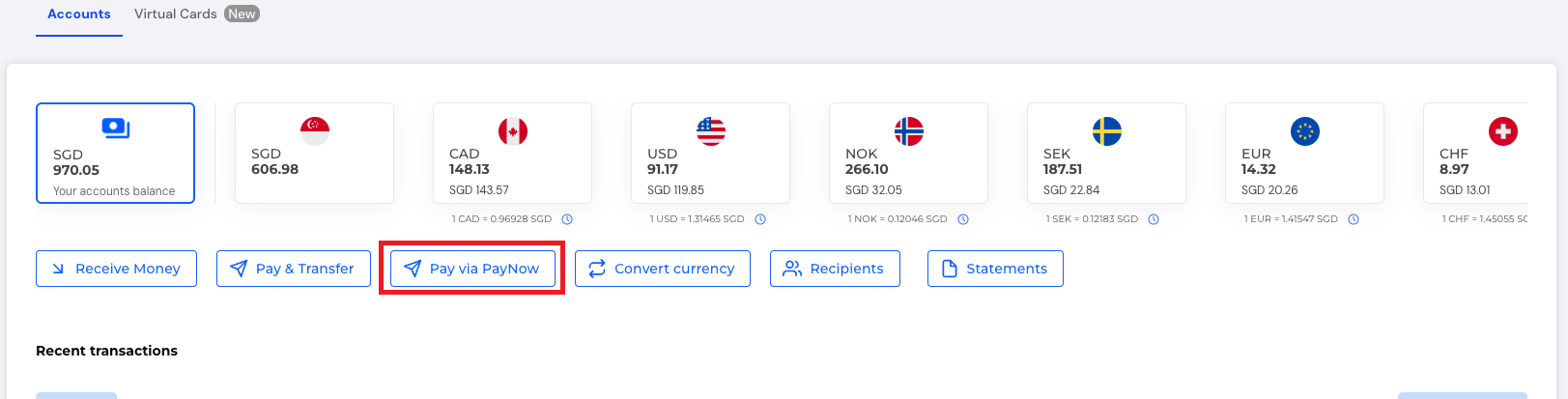
Pay via PayNow
Click “Pay via PayNow”

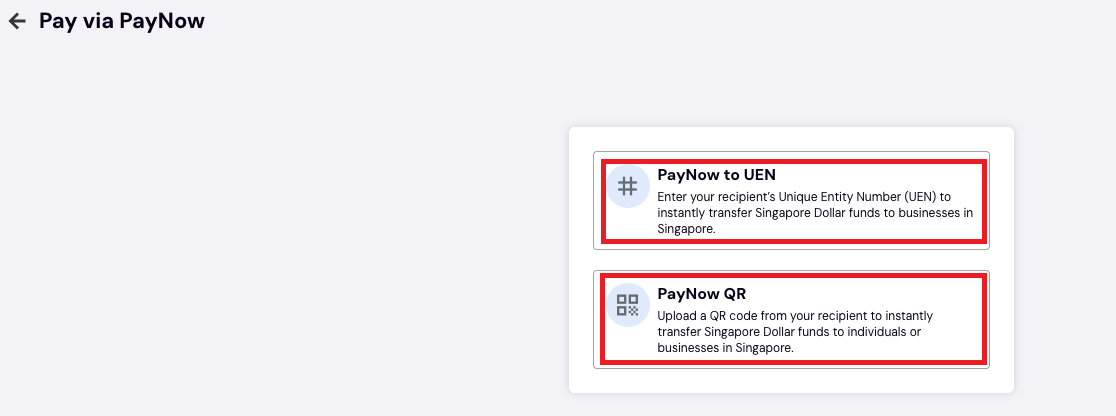
Step 3: Choose payment method

You’ll see two options:

  • PayNow to UEN – Ideal for businesses
  • PayNow QR – For scanned payments
Choose payment method to transfer via PayNow
 

Option A: Pay via UEN

1. Enter the UEN (Unique Entity Number)
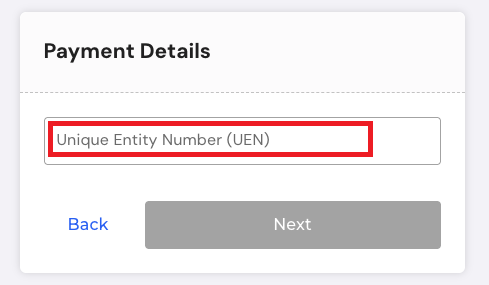
Pay via UEN
Enter the UEN (Unique Entity Number)
 

2. Input the SGD amount and a reference number
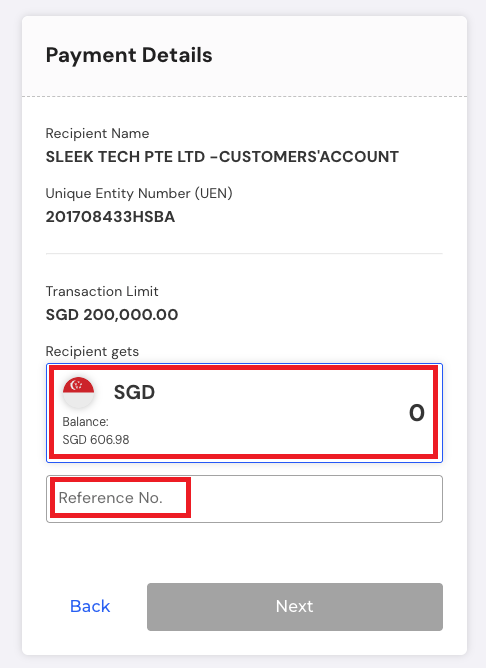
Input the SGD amount and a reference number

3. Review and hit Send
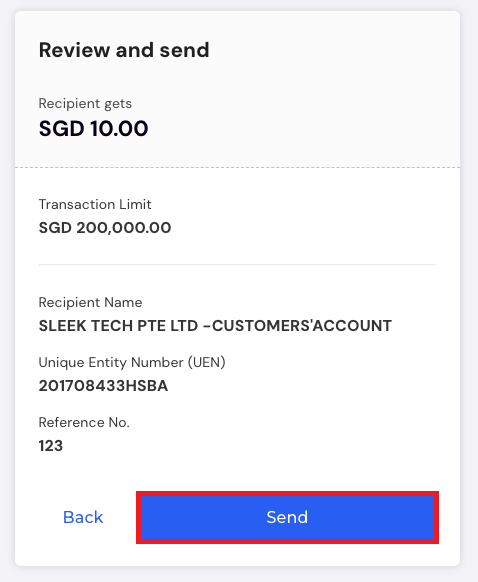
 
How to transfer via PayNow
Review the transaction and send

Option B: Pay via QR

1. Upload a valid QR code in PNG, JPG, or JPEG

Upload PayNow QR code

2. If the QR is dynamic, amount & reference are preset

Dynamic QR code
Dynamic QR code payment

3. If it’s static, you’ll need to input them yourself
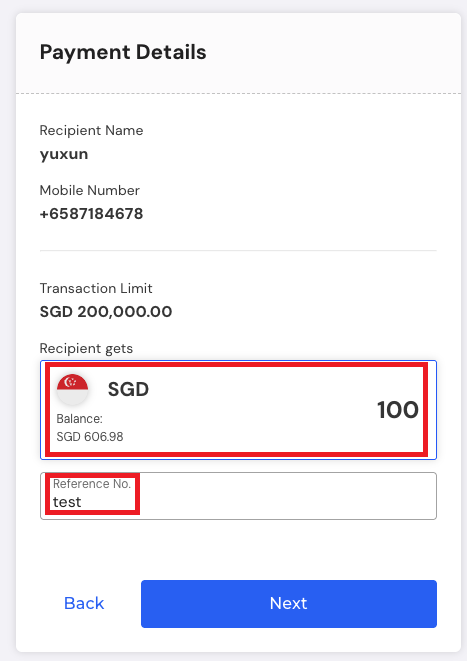
Static QR code
Static QR code payment

Step 4: Proof of payment

Once successful, you can download a screenshot as payment proof.

Proof of payment while sending money via PayNow
Proof of payment

Check under ‘Recent transactions’ to view the PayNow payment alongside the status and details.

How to transfer via PayNow and receive funds?

Worried about clients not paying correctly? Here’s how to ensure everything lands in your account seamlessly.

Step 1: Log into your Sleek Account

Go to Sleek → Click “Log in”

Log in to Sleek
Log into your Sleek account

Step 2: Access your business account

Click Business Account on the left panel.
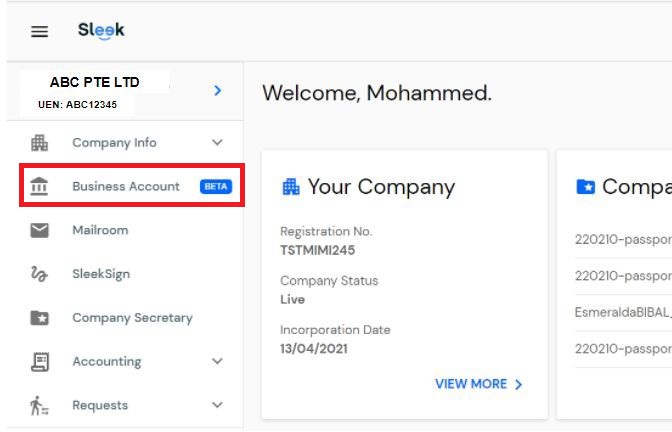
Sleek Business Account
Select the Sleek Business Account

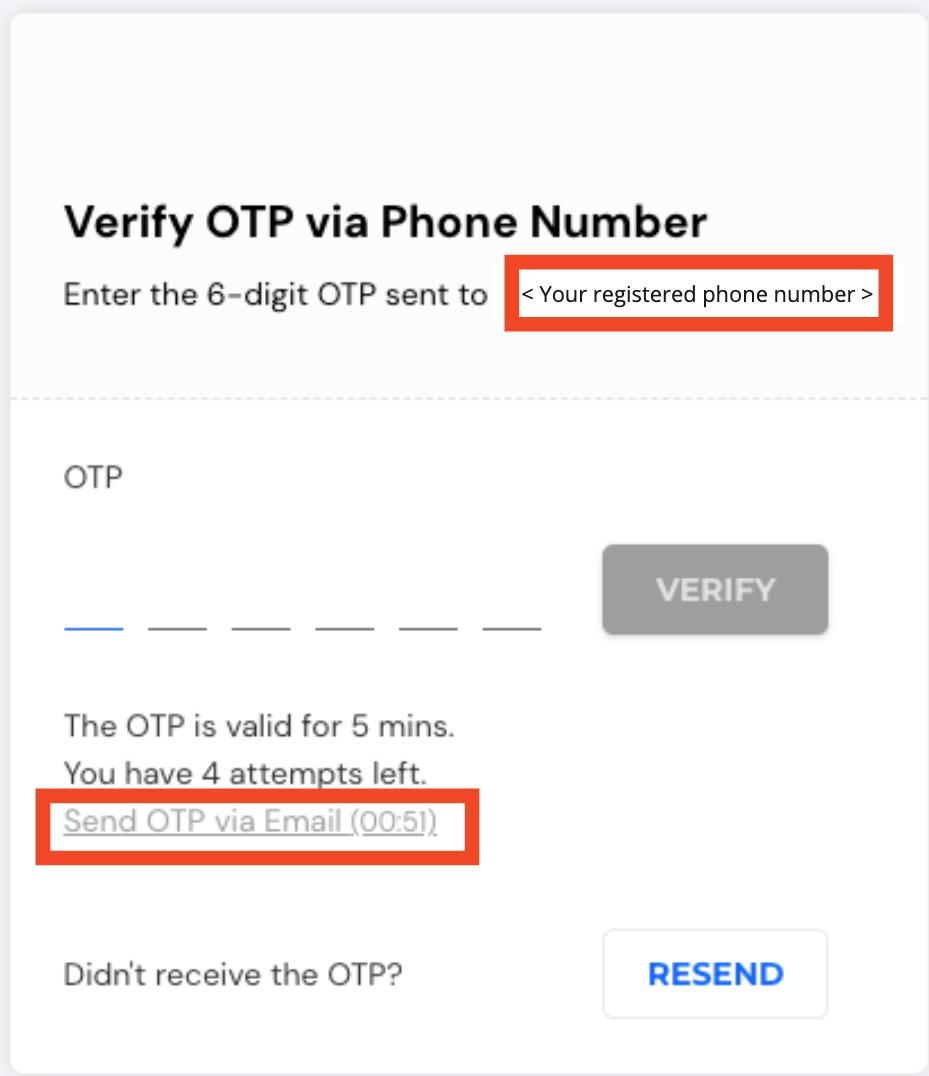
Then, authenticate with OTP.

Verify OTP to receive money
Authenticate the transaction using OTP

Step 3: Click “Receive Money”

On your Sleek Business Account, click “Receive Money”.
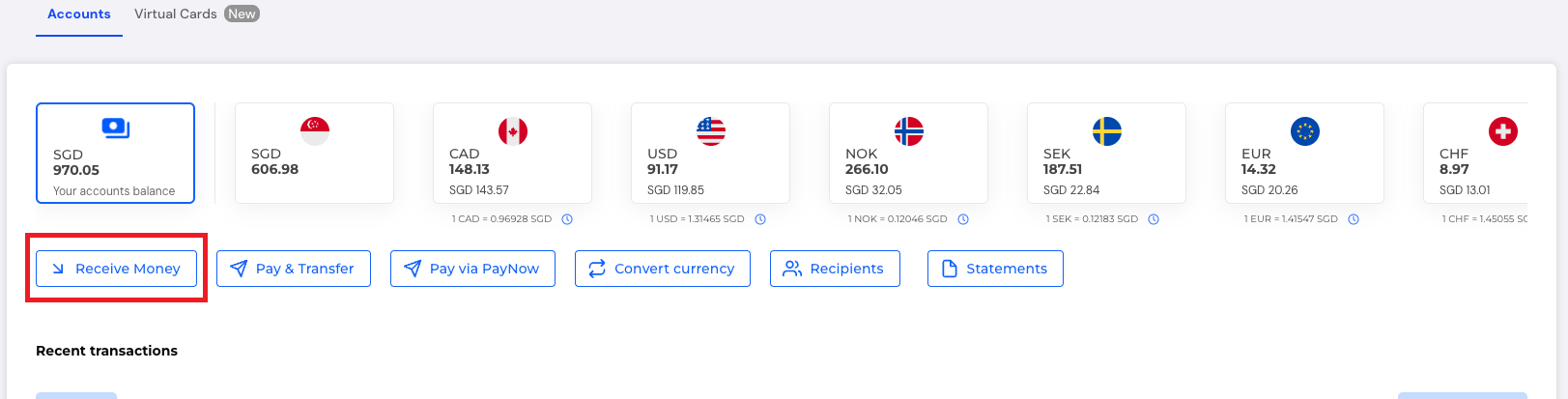
Receive money via PayNow
Click “Receive Money”

Note: The sender will see “Sleek Tech” as the recipient – we collect on your behalf.

Step 4: Generate PayNow QR

1. Select PayNow QR
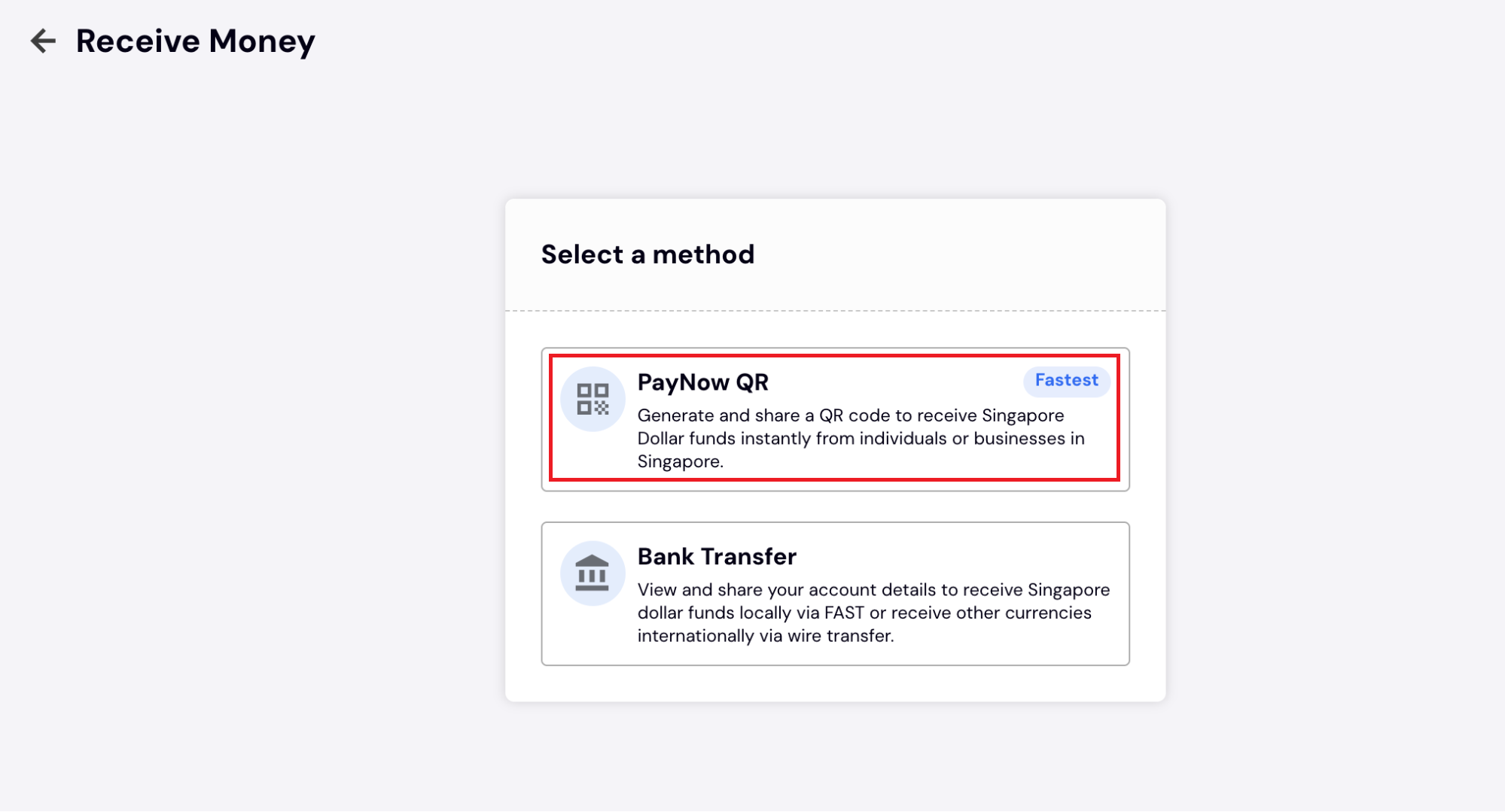
Generate PayNow QR
Generate PayNow QR

2. Set the amount, reference, and QR expiry
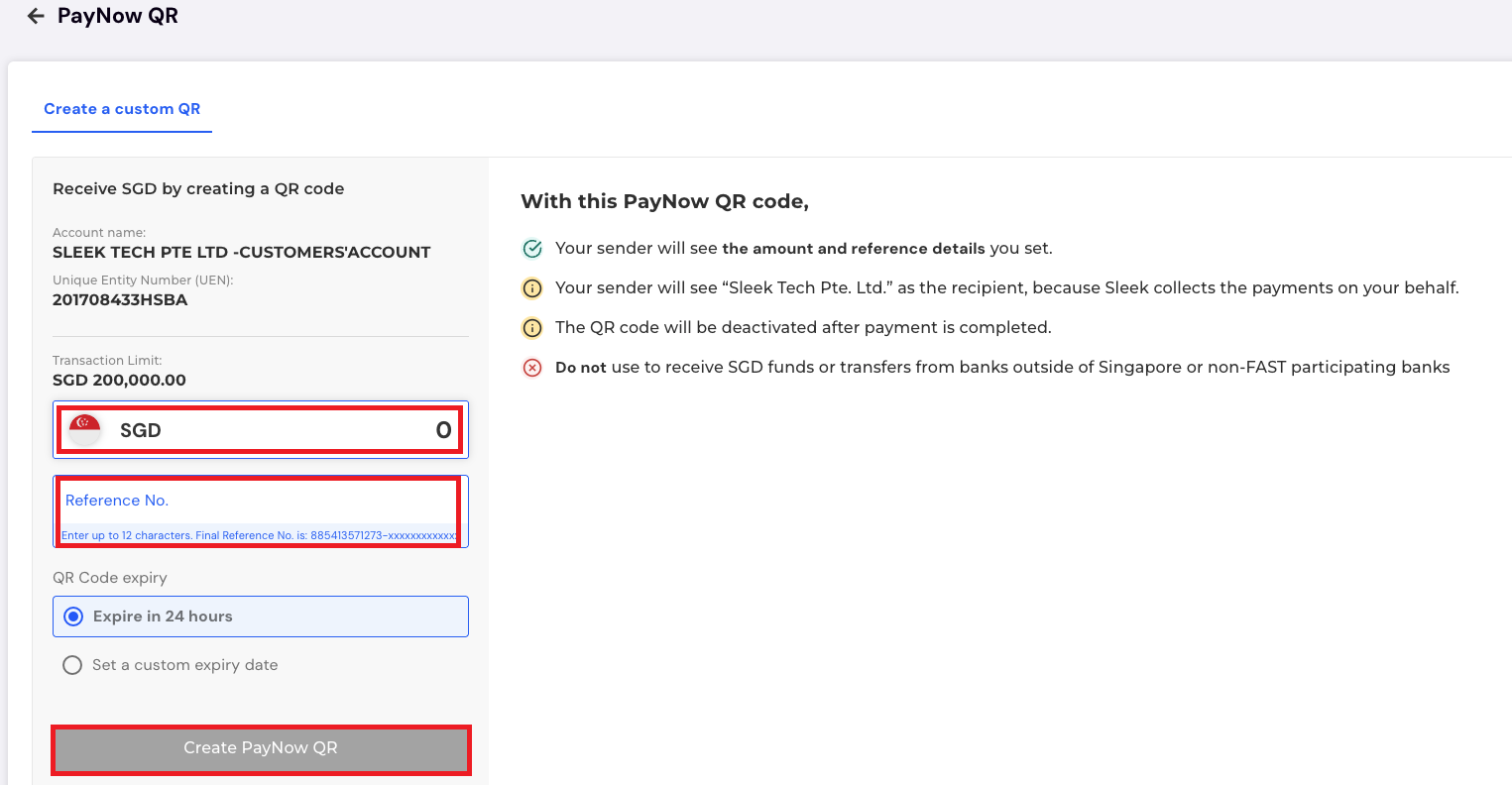
Set the amount, reference, and QR expiry

3. Click “Create PayNow QR”

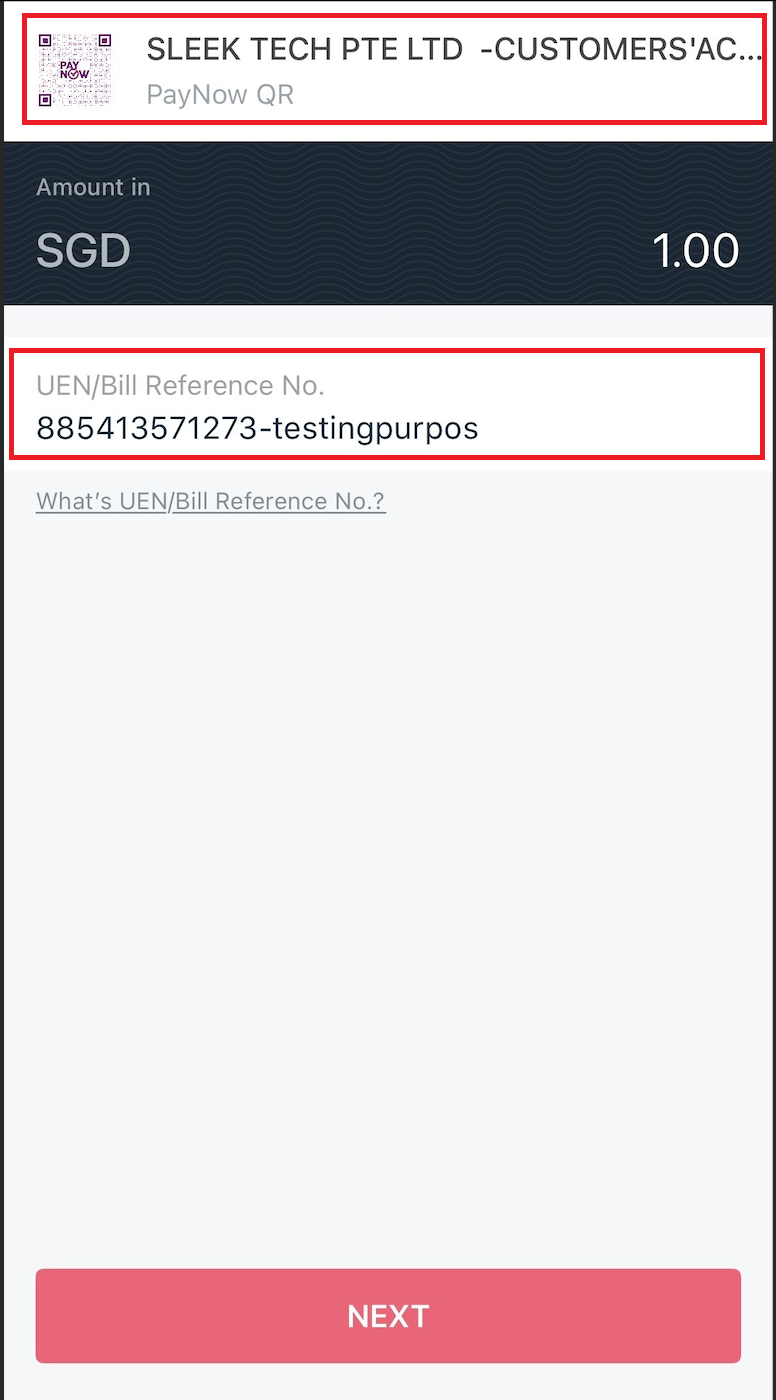
Step 5: Sender completes the payment

Your client will see:

  • Recipient name: “SLEEK TECH PTE LTD – CUSTOMERS’ ACCOUNT”
  • Reference number you’ve set
Sender completes the payment on PayNow

Common PayNow issues (and how to avoid them)

Problem

Why it happens

How to fix it

Invalid QR code

Expired or unsupported format

Ask the recipient for a new one

Mismatched recipient name

Could be a third-party account name or a wrong UEN/QR

Confirm the name with the recipient before proceeding

No reference received

Sender skipped the input

Always set a clear reference

Payment delay

Non-participating bank or service disruption

Ask sender to check if their bank supports PayNow or try again later

Download the full PayNow guides (PDF)

Need an offline version for easy reference or to share with your finance team?

Download our step-by-step PDF guides, complete with screenshots, common error fixes, and tips to make PayNow transfers seamless:

📤 Download Outgoing Transactions Guide (PDF)

📩 Download Incoming Transactions Guide (PDF)

How Sleek helps you use PayNow in Singapore

Whether you’re a freelancer getting paid by clients or a business paying suppliers, PayNow simplifies cash flow quickly, traceably, and securely. Now that you’ve learnt how to transfer via PayNow in Singapore, take advantage of its speed and clarity to streamline your business.

Sleek supports this every step of the way. Here’s how we make it work for your business:

  • Integrated business account access: All PayNow transactions are managed directly inside your Sleek Business Account. There’s no need to toggle between banking apps and spreadsheets.
  • Easy setup with built-in security: Generate PayNow QR codes and authenticate with OTP. Sleek ensures secure access every step while handling collections on your behalf.
  • Automated tracking and record-keeping: Every PayNow transaction is logged with timestamps, statuses, and downloadable proof, keeping your accounting audit-ready.
  • More transparent communication with clients: When you generate a QR code or input a reference number, Sleek ensures that your sender sees precisely what you want them to see. 
  • Human support that actually works: If you’re stuck or unsure, get help from a real team. We’re just a message away, ready to walk you through your first transfer or troubleshoot any hiccups.

With Sleek, PayNow becomes less of a task and more of a built-in part of how you run your business. It stays straightforward, secure, and easy to manage.

Want to use PayNow easily?

FAQs on using PayNow in Singapore

Yes, PayNow is generally free for personal users, but business users in Singapore may incur small fees, depending on their bank or service provider. Some banks charge a nominal amount per transaction. If you’re using the Sleek Business Account, PayNow transfers come with clear, upfront pricing and no hidden charges, making it easy to budget and plan for your payment processes.

The main difference lies in how the payment is initiated.

  • PayNow to UEN lets you send money using the recipient’s Unique Entity Number, which is ideal for standard business-to-business (B2B) payments.
  • PayNow QR generates a scannable code that contains preset payment details like amount and reference, making it more user-friendly and less error-prone, especially when dealing with clients who are less familiar with your UEN.

Both methods are available in Sleek’s business account, so you can use whichever suits your transaction flow.

Yes, you can. With a Sleek Business Account, every PayNow transaction is automatically logged with full details: transaction amount, reference number, status, and timestamp. You can also download proof of payment for each transaction, which makes monthly reconciliation, financial reporting, and audit preparation significantly easier and more reliable.

Yes, PayNow is not limited to corporate payers. Anyone with a Singapore bank account can send SGD payments to your UEN or PayNow QR code, whether they are a business, a freelancer, or an individual. This is particularly useful for SMEs, service providers, and freelancers who serve a mix of client types.

Yes, PayNow is highly secure and built on Singapore’s real-time payment infrastructure. It uses bank-grade security protocols, including two-factor authentication (2FA), OTP verification, and encrypted data transfers. When you use PayNow through Sleek, you gain additional protections like role-based access control, virtual account separation, and a secure transaction environment designed specifically for businesses.

Sleek is the preferred partner of entrepreneurs
Expertise in company incorporation, accounting, tax services, and compliance.
Trusted by over
450,000
businesses worldwide.
4.8/5
five stars icon
on Google
from 4,100+ reviews.
95%
satisfaction rate from
16,000 surveyed clients.